


Smarters Pro - Mobile
4.1310.00 Reviews
App Specs
- Version
- 1.1.5
- Updated On
- License
- Free
- Downloads
- 1,000,000+
- Developer
- Tech Smarters
- Categories
- Video Players & Editors
- Platform
- Android, iOS
Screenshots
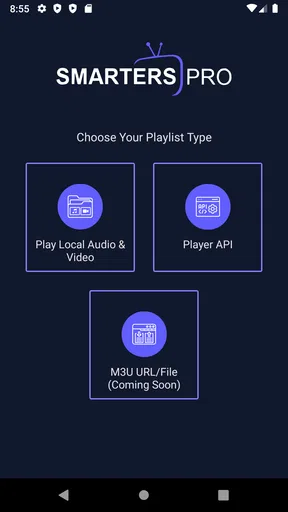
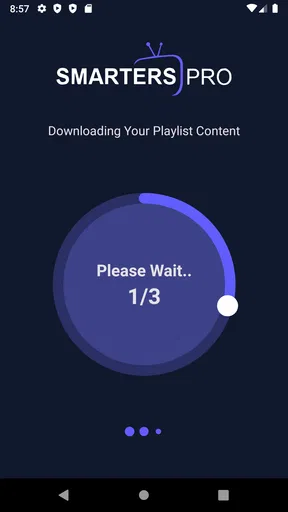
 Analysis by AppCompare
When I’m looking for something to play a video, I want a tool that stays out of the way: open the media, watch it, and get back to what I was doing. That is the sensible way to approach Smarters Pro - Mobile. It is a media player from Tech Smarters, not a task manager or a video-editing studio, so I judge it by how well it fits into a viewing routine rather than by creative tools it does not claim to be.
A player for a particular viewing routine
I’d consider this app when I want a dedicated place on my phone for media playback instead of relying only on the default player bundled with the device. A separate player can be useful when I move between different sources or prefer to keep viewing separate from the gallery, but the practical value depends on the media I intend to open and the way I already organize it. It is best treated as a playback tool, not as a way to make, edit, or publish video.
The app sits in the video-player category, is free to install, and is rated for Everyone. Its Android release requires version 5.0 or later; the current version is 1.1.5. It has an average rating of 4.3 from around 11,000 ratings, with more than a million installs. That gives me a reason to put it on a shortlist, but popularity alone cannot tell me whether its playback workflow will suit my files or habits.
Choosing media before pressing play
My useful starting point would be a small, ordinary test: open a video I watch regularly, check that its picture and sound behave as expected, and then try a second file from a different source. That is more informative than installing a player and immediately moving an entire collection. If the app fits those first few checks, I can decide whether it deserves a regular place on my home screen.
For a creator, the relevant role is at the review stage. I might use a player to watch a draft export on the same kind of screen where a friend or client will see it, then note anything that looks distracting before sending the file along. This is a viewing check, not an editing step: I would still make changes in a dedicated editor and export the revised version from there.
How I would work it into a media workflow
When I’m checking a finished clip, I try to watch it from beginning to end rather than scrubbing only through the section I expect to be troublesome. A full pass can catch a cut that feels abrupt, a title that stays on screen too briefly, or audio that becomes hard to follow near the end. I would use Smarters Pro as the viewing window for that check, while keeping the actual project and edits in the software that created them.
One practical habit is to keep a short note outside the player as I watch: the moment that needs attention, what I noticed, and what I plan to change. That makes a second review more focused and avoids relying on memory. It is especially useful when I’m checking several versions of a short clip, because I can compare the same moments without pretending the player is a project-management or version-control system.
Worth Reading Before You Choose

Flipboard Shows What News Apps Must Do Beyond the Feed

Switching to Android Auto Means Rethinking Your Driving Routine

Google Calendar Makes a Crowded Week Easier to Manage

Ludo King Makes the Most of the Minutes Between Plans

Baby Panda World Brings Quick Play to Modern Phones, but Its Game Library Feels Busy

ESPN’s Live Game View Makes Following Close Games Easier
What it can and cannot replace
Compared with the default player on a phone, a dedicated app is worth considering when I want to try another playback option or keep viewing habits separate from browsing photos. Compared with a full editor, though, the difference is simple: a player is for watching, while an editor is for changing footage, assembling a timeline, and producing a new file. I would not choose this app to add captions, trim a scene, build a montage, or publish a finished video.
That distinction matters if the word “Pro” suggests a complete creator suite. The name should not set expectations beyond the app’s role as a media player. If my main goal is making social clips, adding effects, or exporting in a particular format, I’d look for an editor designed around those jobs and use a player only to inspect the result.
Everyday checks that make playback more useful
For a realistic example, imagine I’ve received a family video while commuting and want to check it before sharing it with relatives later. I would first make sure I have a suitable connection or a local copy, open the clip, and watch enough to confirm it is the intended file. If I’m somewhere noisy, I’d use headphones where practical; if the screen is small, I’d pay attention to whether details are actually legible rather than assuming they will look the same on a larger display.
For work, I’d use a similar routine with a presentation recording or a draft demonstration: watch once for the overall flow, then replay only the moments where a visual change or spoken explanation may need another look. The useful trade-off is that a phone makes review convenient, but it is not a substitute for checking a deliverable on the screen, speakers, or setup it is ultimately meant for.
Who should give it a try
I can see the appeal for someone who wants a straightforward mobile player and is willing to test it with the media they actually watch. It may also be handy for people who review clips on the go and want playback to be a separate step from editing. Tech Smarters is the developer, and the app is free to download, although in-app purchases are listed at $5.99 per item; I’d check the purchase details in the app before paying for anything.
I’d skip it if I need a reliable video editor, a library workflow with specific organization tools, or a player that I already know supports a particular format or connection method. Those needs call for checking the relevant feature directly before making it part of a routine. On iOS, I’d also check the current store page for device requirements before installing, rather than assuming the Android minimum applies there too.
Getting Started with Smarters Pro - Mobile
First off, let’s talk about getting the app up and running. Downloading Smarters Pro - Mobile was a breeze. Available on both Android and iOS, you can find it on Google Play or the App Store. Once installed, the setup process is quite intuitive. You don’t need to be a tech wizard to navigate through the onboarding. The app greets you with a clean interface and a quick tutorial to get you started.
After setting it up, I was impressed by how the app integrates seamlessly with other tools I use daily. Whether it’s syncing with my calendar or pulling in data from my email, everything just works. It’s like the app knows exactly what you need, when you need it.
Features That Stand Out
Let’s dive into what makes Smarters Pro - Mobile a must-have. One of the standout features is its task management system. You can create tasks, set deadlines, and even categorize them based on priority. I’ve found this particularly useful for keeping my work and personal life organized. No more missed deadlines or forgotten appointments!
Another feature worth mentioning is the app’s ability to customize notifications. You can set reminders for each task, and the app will nudge you at just the right moment. I’ve set it up to remind me of meetings and even when to take a break. It’s like having a gentle nudge from a friend, keeping you on track.
For those who love analytics, the app provides insights into your productivity patterns. It’s eye-opening to see where your time goes and find ways to improve efficiency. I’ve started adjusting my schedule based on these insights, and it’s made a world of difference.
User Experience and Design
Speaking of design, the user interface is sleek and modern. The developers have done a fantastic job of balancing functionality with aesthetics. The app is visually appealing without being cluttered, which is something I truly appreciate.
Navigating through the app is smooth, and everything is just a tap away. Whether you’re adding a new task or checking your schedule, the process is seamless. It’s clear that a lot of thought went into making sure the app is user-friendly.
Security and Privacy
In today’s digital age, security and privacy are paramount. Smarters Pro - Mobile takes this seriously, offering robust security features to protect your data. Whether it’s personal information or sensitive work details, you can trust that your data is safe. The app uses encryption to ensure that your information remains confidential.
Additionally, the app provides options to customize your privacy settings. You can control what data is shared and with whom, giving you peace of mind. It’s reassuring to know that the app respects user privacy and prioritizes data protection.
Final Thoughts
Overall, Smarters Pro - Mobile has become an indispensable tool in my daily routine. It’s more than just a task manager; it’s a comprehensive productivity solution. The app’s intuitive design, coupled with its powerful features, makes it a standout choice for anyone looking to boost their productivity.
If you’re like me and appreciate having everything organized and accessible in one place, give Smarters Pro - Mobile a try. It’s transformed the way I manage my tasks, and I’m confident it will do the same for you. So, head over to Google Play or the App Store, download it, and start experiencing the magic for yourself!
Pros
- User-friendly interface for seamless navigation.
- Supports multiple playlists for diverse content.
- High-quality streaming with minimal buffering.
- Offline download feature for on-the-go access.
- Customizable settings for a personalized experience.
Cons
- Requires stable internet for optimal performance.
- Limited support for older device models.
- Ads can be intrusive in the free version.
- Subscription needed for premium features.
- Initial setup may be confusing for beginners.
FAQs for Smarters Pro - Mobile
What platforms is Smarters Pro - Mobile available on?
Smarters Pro - Mobile is available for both Android and iOS platforms. This ensures that users with different devices can enjoy the app's features. It can be downloaded from the Google Play Store for Android users and the App Store for iOS users. Ensure your device meets the minimum requirements for optimal performance.
What are the key features of Smarters Pro - Mobile?
Smarters Pro - Mobile offers a range of features designed to enhance your streaming experience. Key features include a user-friendly interface, support for multiple formats, EPG support, parental control, and multi-screen functionality. These features make it an attractive option for users looking to manage their streaming content efficiently.
Is Smarters Pro - Mobile free to use?
Smarters Pro - Mobile is available for free download, but some features may require in-app purchases or subscriptions. Users should review the pricing details within the app to understand which features are included in the free version and which require additional payment. This ensures transparency and helps users make informed decisions.
How secure is Smarters Pro - Mobile for user data?
Smarters Pro - Mobile prioritizes user data security by implementing encryption and secure data handling practices. However, users should always check the privacy policy to understand how their data is managed. Keeping the app updated also enhances security by applying the latest patches and improvements.
Does Smarters Pro - Mobile support multiple languages?
Yes, Smarters Pro - Mobile offers support for multiple languages, catering to a diverse user base. This feature enhances accessibility and ensures that users from different regions can navigate and use the app comfortably. Users can select their preferred language from the settings menu within the app.


